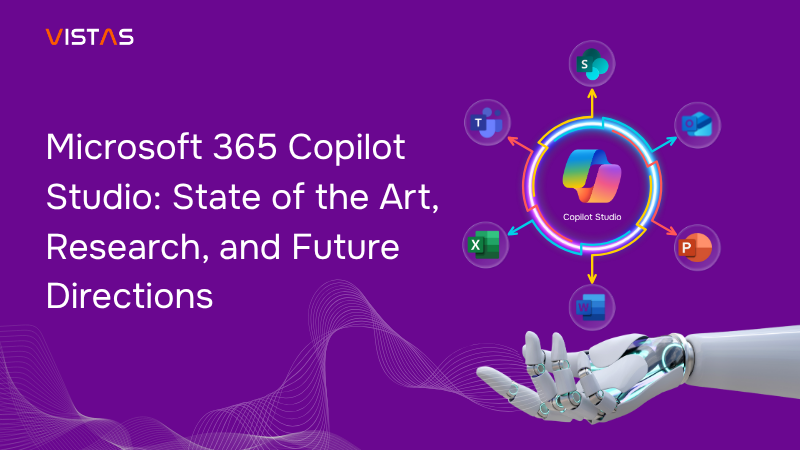
Generative AI is no longer just about chatbots or simple assistants — it’s rapidly evolving into agentic workflows that can reason, orchestrate, and execute complex, multi-step tasks. At the center of this shift is Microsoft 365 Copilot Studio, a low-code/no-code platform that empowers organizations to design, customize, and manage AI agents across Microsoft 365.
Seamlessly embedded into familiar tools like Word, Excel, Teams, and SharePoint, Copilot Studio enables businesses to extend Copilot’s capabilities with their own tailored agents — or leverage prebuilt ones — to address unique workflows. In the past year, Microsoft has significantly accelerated innovation, adding flexibility with multiple models, stronger security and governance, advanced orchestration, and deeper analytics.
This blog explores where Copilot Studio stands today, the research driving its evolution, the challenges still ahead, and the trends shaping the future of enterprise AI agents.
I. Architectural Overview & Positioning
Copilot Studio operates within the broader human–AI collaboration ecosystem in Microsoft 365. Its main components include:
- Microsoft 365 Copilot: The user-facing assistant experience embedded in Office apps (Word, Excel, PowerPoint, Outlook, Teams).
- Agents: Specialized autonomous or semi-autonomous AI components built in Copilot Studio (or Azure) to perform domain-specific tasks (e.g. HR onboarding, data insight, meeting summarization).
- Model Layer: Underlying LLMs and reasoning engines (OpenAI, Anthropic, Azure models) that power agents’ generation, logic, and orchestration.
- Governance / Admin / Security Layer: Controls for enabling/disabling agents, access, identity (via Entra), security monitoring, audit, and fallback modes.
- Data & Knowledge Connectors: Connectors (Graph, custom sources) that allow agents to fetch from emails, Teams, documents, databases, etc.
- Analytics / Evaluation / Monitoring: Tools to analyze agent performance, monitor failures, usage trends, and improve agents over time.
One way to see Copilot Studio is as a glue between the foundation model layer and the business domain/organization — helping non-AI experts encapsulate domain logic, constraints, data context, and workflows into agents that end users can interact with.
II. Agent Lifecycle in Copilot Studio
Typical phases:
- Design / Configuration: Define the agent’s domain, prompts, flows, branching logic, and external tool or data integration.
- Model selection / tuning: Choose which LLM(s) the agent will use; optionally fine-tune or “tune” the model with domain data (copilot tuning).
- Testing / evaluation: Run evaluation tests (unit, user flows, edge cases) to validate performance.
- Deployment / publishing: Deploy the agent into the organization or marketplace (Agent Store), enable channels (Teams, Copilot Chat, etc.)
- Monitoring & iteration: Use analytics, logs, error data, human feedback to refine the agent.
- Governance / retirement / versioning: Ability to retire, block, version, or revoke agent usage per policy.
Microsoft has been adding features to support each stage more robustly (e.g. agent evaluation tools, analytics, near-real-time security).
III. Recent Major Updates & Capabilities (Late 2024 – 2025)
Here is a curated timeline of significant enhancements and shifts in strategy.
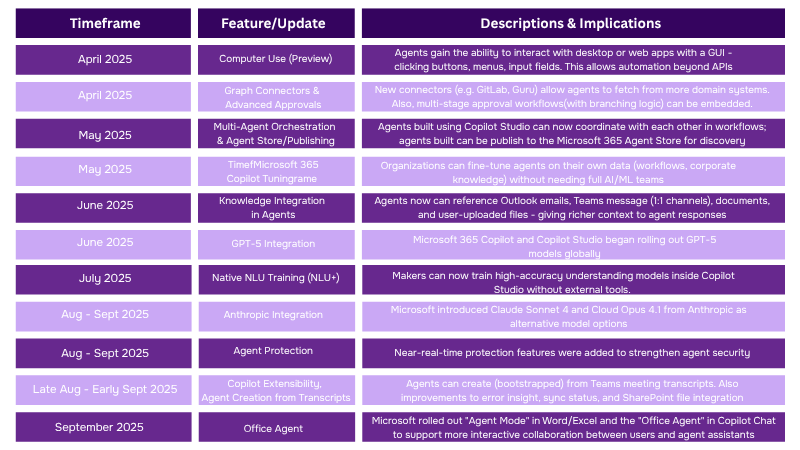
One of the most notable shifts in Microsoft 365 Copilot Studio has been the move toward multi-model flexibility. Where organizations were once limited to OpenAI models, they can now choose between OpenAI and Anthropic models depending on the task or agent requirements. Another key change is the introduction of the Agent Store and Marketplace, enabling agents to be published, discovered, and reused much like traditional apps —significantly expanding scale and accessibility.
At the same time, Microsoft has strengthened governance and identity mapping by giving agents unique identities through Microsoft Entra, allowing administrators to control which agents can be deployed or restricted across user groups. Finally, with agents gaining more autonomy, Microsoft has placed a strong emphasis on security, introducing near-real-time protections to safeguard against misuse and emerging threats.
IV. Use Cases & Adoption Patterns
Common Use Case Archetypes
Some of the key scenarios where Copilot Studio is being leveraged:
1. Document / Proposal Drafting Agents
- E.g. an HR onboarding agent drafts offer letters, combines template with candidate data and internal policy.
- Because Office/Word integration is native, these agents can be embedded where users already are.
2. Data Insights / Analytics Agents
- Agents that fetch from a data lake/fabric, run computations, or produce dashboards, and then translate results into narrative reports. E.g., Fabric data agents.
- In some scenarios, agents can run Python-like reasoning, aggregate metrics, or filter anomalies. (Although heavy computer might still rely on backend services.)
3. Meeting / Email Agents
- Automatically digest meeting transcripts, extract action items, draft follow-up emails, or spawn sub-agents from transcripts.
- Agents created from transcripts reduce manual scaffolding.
4. Workflow / Process Automation
- Agents that orchestrate multi-step internal processes (approvals, notifications, cross-team handoffs) combining AI and rule logic.
- For example, advanced approval flows, conditional branching, multi-agent handoffs.
5. Knowledge / FAQ / Support Agents
- Agents embedding internal documentation, knowledge base, policy documents to answer employee or customer queries.
Adoption and Human Factors
A few research and observational insights:
- A qualitative study of 27 participants using Microsoft 365 Copilot over 6 months revealed that while users appreciated support for tasks like email coaching, meeting summaries, and content retrieval, unmet expectations emerged in deeper reasoning or highly contextual tasks. Many flagged concerns about data privacy, transparency, and bias.
- Another cognitive/neuroscience study found that for objective tasks (e.g. reading comprehension), Copilot reduced workload and increased enjoyment; for more subjective tasks (e.g. personal reflection) no performance gain was observed. This suggests that AI copilots are more helpful when tasks are structured and less so when they require deep context or personal insight.
- The shift from “assistant” to “agent” increases expectations: users expect agents to not just respond, but act, chain steps, and coordinate multiple tasks. This raises the bar for reliability, transparency, and error handling.
Thus, adoption depends heavily on user trust, clear boundaries, fallback paths, and user feedback loops.
V. Challenges, Risks & Open Problems
While the platform is maturing rapidly, several thorny challenges remain.
Technical & Model Challenges
AI agents still face hurdles like model brittleness, prompt injection risks, and performance bottlenecks. Multi-model setups bring flexibility but can slow things down, while securing external inputs remains critical. Continuous evaluation and feedback loops are needed to make agents smarter over time.
✨ Building reliable, secure, and efficient AI agents requires ongoing tuning and safeguards.
Governance, Compliance & Trust
Enterprises need to ensure agents handle sensitive data safely while staying compliant with regulations. Building trust means clear transparency, auditability, and lifecycle management — along with safeguards like human fallback and clear communication of agent limits.
✨ Trust in AI agents depends on strong governance, compliance, and user transparency.
Ecosystem & Integration
The agent ecosystem is growing fast but remains fragmented. Connecting Microsoft-based agents with third-party tools, legacy systems, and custom databases still requires effort. Discoverability, reuse, and secure sharing will be essential to drive adoption at scale.
✨ A unified, open ecosystem is key to unlocking the full potential of AI agents.
VI. How Recent Advances Address Some Challenges
It’s worth highlighting how Microsoft’s recent updates help mitigate some of these challenges:
- Multi-model choice (OpenAI + Anthropic) gives flexibility to match models to tasks, reducing brittle behavior.
- Near-real-time agent protection adds an extra security layer for monitoring agent runtime behavior.
- Identity / governance integration (Entra Agent ID, admin controls) helps manage lifecycle and access control.
- Analytics, evaluation, model tuning (Copilot Tuning) embed feedback and iteration capabilities.
- Agent creation from transcripts, and improved extensibility, reduce friction in spawning new agents in existing workflows.
So, the trajectory is toward safer, more context-aware, more team-oriented agents.
VII. Research Themes & Open Questions
From the academic and industrial research perspective, Copilot Studio and agent systems touch on multiple research areas. Some of the key questions include:
❓Robustness & Safety: How can agents defend against prompt injection, data leaks, and context poisoning while using least-privilege access and layered defenses?
❓Human–Agent Collaboration: Which tasks truly benefit from AI support, and how do we balance autonomy with human oversight?
❓Evaluation & Benchmarking: What metrics best measure real-world performance, and how can we simulate edge cases during testing?
❓ Continuous Learning: How can agents adapt and improve from feedback without risky or costly retraining?
❓Multi-Agent Orchestration: How do we prevent conflicts, deadlocks, or duplication when multiple agents work together?
❓Transparency & Trust: How much explanation do users need, and can agents adjust based on trust levels?
❓Business Adoption: What incentive models will drive investment in agent marketplaces and enterprise adoption?
VIII. Practical Guidance for Organizations & Developers
If your organization or research group is planning to adopt or build with Copilot Studio, here are some best practices and tips:
- Start with small, focused agents: Begin with narrow, well-scoped use cases (like drafting emails or summarizing meetings) instead of broad autonomy. This lowers risk, makes testing easier, and builds early user trust.
- Keep humans in the loop: For high-stakes or ambiguous decisions, agents should provide “confidence” signals and route outcomes to human reviewers when necessary. This balances efficiency with accountability.
- Test, version, and audit consistently: Maintain version control for prompts and logic, simulate edge cases (including adversarial inputs), and log agent actions to ensure transparency and reliability.
- Apply strict data access principles: Grant agents only the minimum access they need, and use provenance tagging to track data origins and usage. This helps reduce risks of leakage or misuse.
- Iterate with feedback loops: Monitor errors, collect user corrections, and leverage built-in analytics to continuously refine and improve agent performance over time.
- Align with governance and compliance early: Involve compliance, security, and legal teams from the start. Establish clear guardrails such as disallowed actions, content boundaries, and regular review processes.
- Plan for agent lifecycle management: Treat agents like products—version them, plan for retirement or replacement, and use identity tools like Microsoft Entra for access control and revocation.
- Experiment with models and hybrid setups: Test different large language models (e.g., OpenAI vs. Claude) for specific tasks and consider hybrid designs that pair lightweight models for simple tasks with larger ones for reasoning-heavy scenarios.
IX. Future Outlook

Over the next 6–12 months, we can expect rapid advancements in the AI agent space as platforms like Microsoft Copilot Studio continue to evolve. One major priority will be strengthening adversarial defenses. With vulnerabilities such as prompt injection already exploited in the wild, providers will increasingly invest in hardened safeguards, better context partitioning, and more resilient architectures to protect enterprise data.
Another clear trend is the rise of multi-model and localized AI options. Instead of relying on a single large model, organizations will mix open-source, academic, or domain-specific models — often tuned for local regulations and languages. This diversity will improve flexibility while giving businesses more control over how AI agents operate in different regions and industries.
We’ll also see the ecosystem expand through an agent marketplace. Much like mobile app stores, Microsoft and third parties are expected to offer vertical-specific agents for industries like finance, healthcare, and legal, creating new opportunities for adoption and customization. To support this, tighter integration with legacy and hybrid infrastructures will be essential, ensuring that AI agents can work securely alongside existing enterprise systems.
Looking further ahead, tools that auto-generate agents from workflows, meeting transcripts, or usage logs will make development faster and more intuitive. At the same time, regulated industries will push for explainability and certification standards — creating “audit-ready” agents that can be trusted in high-stakes environments. Finally, advances in lightweight models will enable agents to run on the edge or in offline scenarios, while robust sandboxing environments will allow organizations to test agents safely before deploying them at scale.
The future of AI agents lies in stronger security, smarter integrations, and an open ecosystem that balances innovation with trust.